Authoring AI Agents
AI Agents empower employees, customers, and partners to communicate seamlessly with your business and enterprise systems. Leveraging cutting-edge technologies and design principles, these AI Agents deliver an intuitive user experience across all business functions, tasks, and devices. By providing efficient assistance, they reduce user operation time, enhance data quality, and lower overall costs.
With Druid, you can create both simple AI Agents for answering questions and sophisticated digital workers that perform complex business tasks.
AI Agent Overview
An AI Agent is a software system that interacts with users or operates autonomously to perform reasoning, retrieve knowledge, and execute actions within a defined scope. AI Agents can be built using either deterministic, NLP-based flows or the agentic AI framework powered by large language models. All AI Agents remain governed by enterprise rules, integrations, and oversight.
AI Agents are categorized into two types based on their operational mode:
Conversational AI Agents
A Conversational AI Agent combines conversational interface capabilities with actionable tools. Key characteristics include:
- Engages in interactive dialogue with users
- Provides conversational interface coupled with tools and API access
- Executes multi-step workflows (such as creating tickets, resetting passwords, or updating CRM systems)
- Can operate using deterministic, NLP-based flows (traditional rule-based approach) or agentic AI reasoning
- Handles complex resolution tasks with clarifying questions
- Incorporates guardrails, approvals, and policy enforcement
Conversational AI Agents are ideal for service desks, customer support, and employee self-service scenarios.
Autonomous AI Agents
An Autonomous AI Agent operates as an autonomous digital worker or employee that functions independently. Key characteristics include:
- Plans tasks and calls tools/APIs autonomously
- Operates in the background without requiring user conversation
- May be event-driven (triggering actions when specific conditions occur)
- May involve multi-AI Agent collaboration (such as planner and executor roles)
Autonomous AI Agents are ideal for automation, operations, workflows, and productivity enhancement.
How AI Agents Operate
Equipped with over 250 built-in skills tailored for diverse industries and roles, Druid AI Agents can perform the following actions:
- Respond to inquiries
- Send channel notifications for tasks or workflows
- Generate detailed reports in PDF, MS Word, or Excel formats
- Monitor enterprise systems, check tasks, and issue status alerts
- Aid users in form completion
- Automatically route to a human operator based on predefined rules or when intent recognition fails.
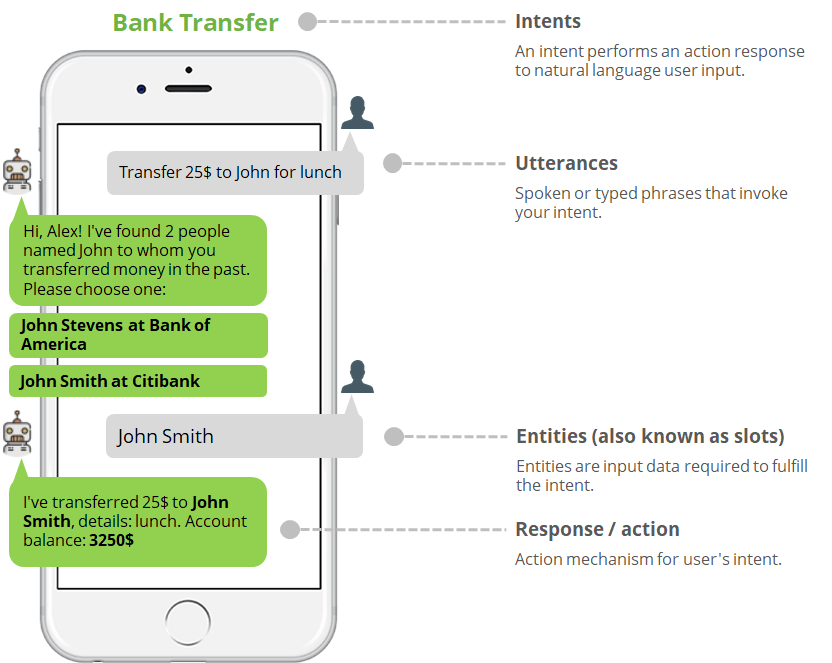
When a user interacts with a Conversational AI Agent, they provide input known as an utterance. Using Natural Language Processing (NLP) or Agentic AI reasoning, the AI Agent analyzes the utterance to extract the intent and entities crucial for effective communication.
- Data Retrieval: If the AI Agent identifies specific entities, it retrieves data from integrated third-party systems to provide a tailored response.
- Action Execution: Drawing on collected entities, agents can initiate and execute specific actions within third-party systems.
The figure below illustrates how an AI Agent orchestrates a bank transfer intent.
Build AI Agents
When creating an AI Agent, follow a structured approach to ensure its effectiveness and success. Here is a step-by-step guide to building AI Agents in the Druid AI Platform:
Step 1: Create the AI Agent
To begin, create the agent and configure its general parameters, including Name, Languages, Theme, Avatar, and NLP interpreter. Additionally, select the appropriate roles for the target audience. Publishing the agent is crucial to make it accessible. Also, create a solution to provide context for the agent functionality.
Step 2: Create flows
Next, create conversation flows or agentic flows within the selected solution. Define intents and dialogs for each flow, comprising various flow steps such as messages, actions, and prompts. Training the agent with diverse user inputs (training phrases) is vital for NLP-based models, while configuring tools and guardrails is essential for agentic models.
Step 3: Test the AI Agent
After you publish the agent, test it thoroughly using the chat bubble in the lower-right corner of the Druid Portal. Fine-tune and retest as needed before deploying it to the desired tenant and communication channels.
Step 4: Enhance with entities and integrations
Integrate the AI Agent with external systems to trigger specific actions based on defined entities. Additionally, leverage integrations with SMS and Email systems to enhance communication with clients.
Integrate the agent with external systems to trigger specific actions based on defined entities or autonomous triggers. Additionally, leverage integrations with SMS and Email systems to enhance communication with clients.
Step 5: Analyze AI Agent performance
After deploying the agent to production, monitor its performance using the agent dashboard in the Druid Portal. Analyze key performance indicators (KPIs) such as task completion rates, user engagement, and active user statistics to make informed decisions and improve business processes.
Step 6: Enable additional channels
Activate additional communication channels as required, such as websites and messaging solutions, to deploy the AI Agent across multiple platforms and reach a broader audience.
By following these steps, you can effectively build, test, analyze, and deploy AI Agents in the Druid AI Platform, empowering your business with intelligent conversational solutions. For detailed instructions on each step, refer to the corresponding sections in the help documentation.
 Related Topics